Top 10 Essential Plugins for a Survival Minecraft Server in 2026

This guide will show you the best plugins to elevate your survival community. Of course, to run these plugins smoothly, you’ll need a powerful server first! If you don’t have one yet, you can check out our different Minecraft server plans available on Fire Hosting.
Running a Vanilla survival server is great, but as your community grows, managing griefers, organizing player teleports, and keeping performance high becomes a challenge.
Whether you are running a small server for a group of friends or building a public community, these are the top 10 essential plugins for a Minecraft Survival server in 2026.
1. EssentialsX
No server can survive without EssentialsX. It is the absolute backbone of Minecraft server management, adding over 100 useful commands.
- Key Features: Introduces player homes (
/sethome,/home), warps, kits, nicknames, and a built-in economy system. - Why you need it: It replaces dozens of smaller plugins by grouping all basic moderator and player commands into one optimized package.
2. LuckPerms
Managing who can use which command is crucial. LuckPerms is the most advanced, user-friendly, and reliable permissions plugin available.
- Key Features: Offers an incredible web-based editor (
/lp editor) to manage ranks and permissions visually. - Why you need it: It allows you to easily create groups like Admin, Mod, or VIP, ensuring players only have access to the commands they are allowed to use.
3. GriefPrevention (or WorldGuard)
Nothing ruins a survival experience faster than a griefer destroying a player’s hard work. GriefPrevention lets players protect their own land.
- Key Features: Players use a golden shovel to claim blocks and create a safe zone where others cannot build, break, or steal from chests.
- Why you need it: It automates land protection so your moderation team doesn’t have to spend hours fixing griefed builds.
4. CoreProtect
Even with protection plugins, accidents happen. CoreProtect is a fast, efficient data logging tool that tracks every single block change on your server.
- Key Features: Allows staff to inspect who placed or broke a block, who opened a chest, and perform rollbacks (
/co rollback) to instantly undo griefing. - Why you need it: If someone manages to steal or destroy a town, you can fix the entire area in seconds without restarting the server.
5. Chunky
Performance is everything. Generated chunks on the fly can cause massive lag spikes on your server. Chunky solves this by pre-generating your world.
- Key Features: Pre-loads world chunks within a defined radius while the server is empty.
- Why you need it: When players explore at high speeds (with Elytras or boats), the server won’t lag because the chunks are already generated and saved on the disk.
6. Vault
While not a plugin that players interact with directly, Vault is a mandatory background manager.
- Key Features: Acts as a bridge between your economy plugin (like EssentialsX), your chat plugins, and your permission systems.
- Why you need it: Most advanced survival plugins (like shops or land claims) require Vault to understand your server’s economy and ranks.
7. EconomyShopGUI
A survival economy is much more engaging when players can buy and sell resources. EconomyShopGUI provides a clean, visual shop system.
- Key Features: Players type
/shopto open a beautiful user interface where they can trade blocks, ores, and mob drops. - Why you need it: It prevents the need to build massive physical sign-shops at spawn, reducing lag and making trading accessible from anywhere.
8. GeyserMC & Floodgate (Crossplay)
In 2026, crossplay is a must-have. GeyserMC allows players on bedrock editions (Xbox, PlayStation, Nintendo Switch, iOS, Android) to join your Java server.
- Key Features: Seamless translation between Java and Bedrock network protocols.
- Why you need it: It vastly expands your potential player base, allowing all your friends to play together regardless of their device.
9. Timber / TreeCapitator
Chopping down massive trees block by block can be tedious. Adding a quality-of-life plugin like a tree capitator keeps survival fun and fast-paced.
- Key Features: Breaking the bottom log of a tree makes the entire tree fall down instantly, while automatically damaging the player’s axe.
- Why you need it: It’s a highly requested feature that players love, saving them time during large building projects.
10. BlueMap (or Dynmap)
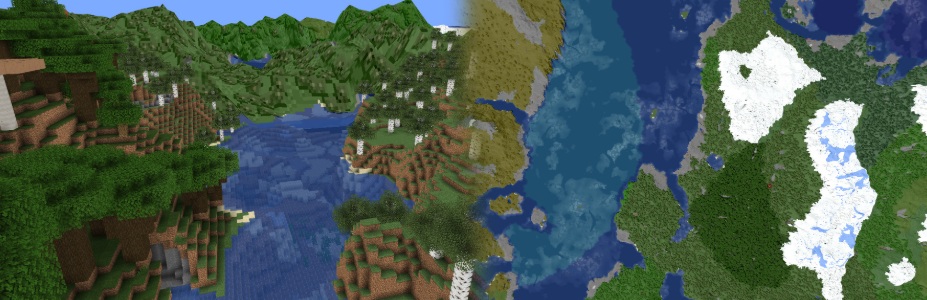
Give your community a bird’s-eye view of their world. Bluemap generates a stunning, interactive 3D map of your Minecraft server accessible via any web browser. Check this web demo of BlueMap.
- Key Features: High-quality 3D renders of players’ builds, real-time player tracking, and world exploration on the web.
- Why you need it: It keeps your community engaged even when they are not in-game, allowing them to show off their survival bases to others.
Ready to Build Your Ultimate Survival Server?
Running all these essential plugins requires a reliable host that won’t lag when your world gets heavy. At Fire Hosting, our panels are fully optimized to support Paper, Purpur, and Forge setups with instant plugin installation.
Launch your own high-performance Minecraft server with Fire Hosting today!